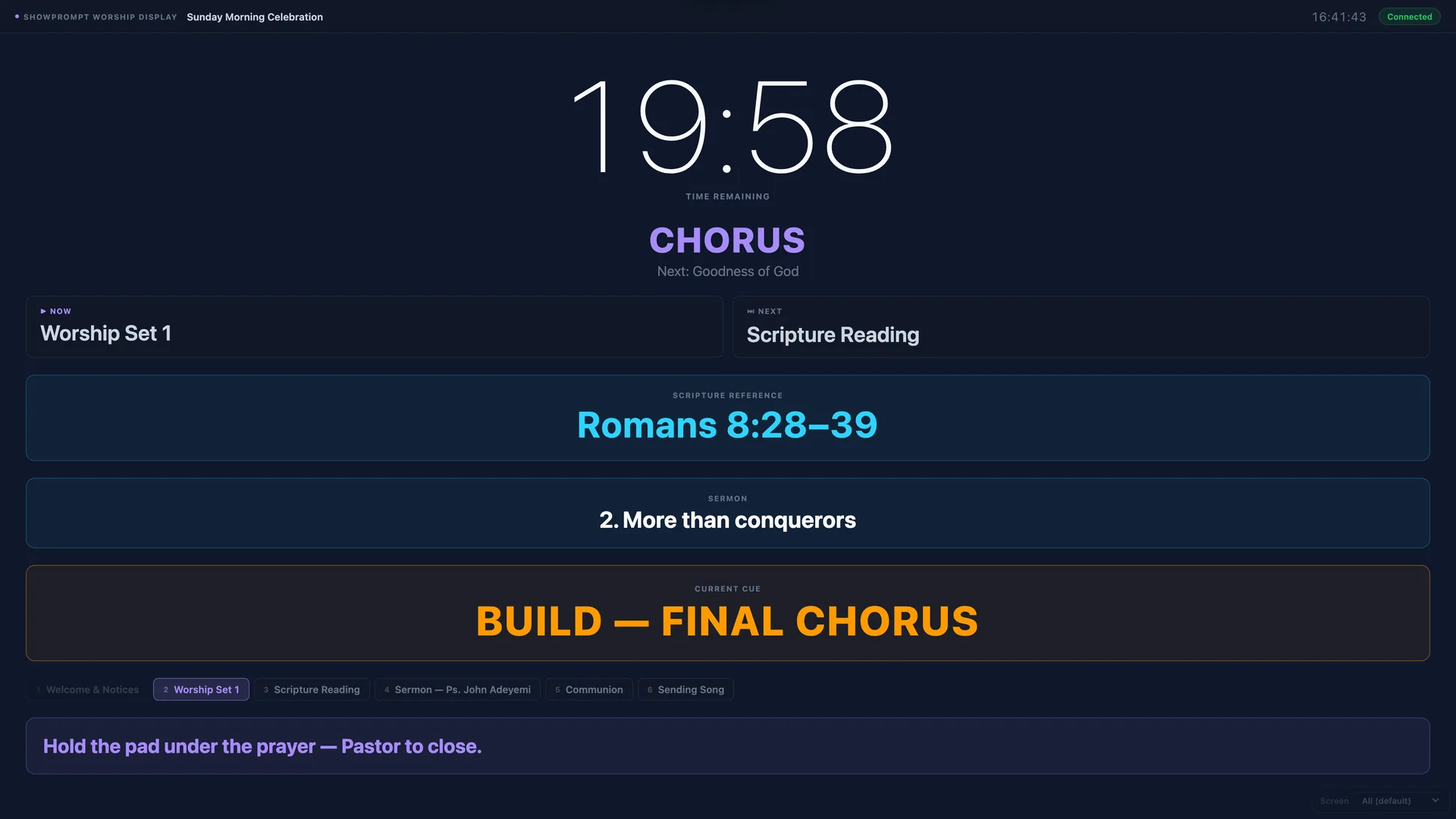
Most churches that run a slick service rely on at least three timers: the pre-service countdown so people know when worship is starting, the sermon timer so the preacher doesn't accidentally run over and miss the kids ministry handover, and a discrete confidence monitor at the front showing the worship leader what's next.
Doing all of this in ProPresenter is fine if you already own it and have someone who knows it well. If you don't — or if you're a smaller church on a smaller budget — you need a worship countdown timer that's genuinely simple, reliable, and free to try.
This guide walks through the setup most worship teams use.
What you'll need
- One laptop running Windows 10/11 or macOS 12+ for the controller
- A TV or projector at the front of the room for the pre-service countdown
- A confidence monitor at the front facing the worship leader (a tablet or monitor on a stand)
- A WiFi or wired network covering the worship space (no internet required during service)
Step 1 — Download ShowPrompt
Download ShowPrompt and run it on your controller laptop. The Free tier handles a basic pre-service countdown straight away. For sermon timers, presenter notes, and multiple screens, you'll need Pro or Venue.
Step 2 — Set up the pre-service countdown
Pick Worship mode. Set a pre-service countdown — typically 10 to 15 minutes before the service starts. Add a custom message: "Welcome — service begins in…"
Open the display URL on the TV or projector at the front of the room. Done. The countdown is now visible to everyone arriving.
Step 3 — Add a sermon timer
For Pro and Venue users, ShowPrompt's Worship mode supports a separate sermon countdown that runs in parallel with the service. Set the duration before the preacher starts. The timer goes amber at your warning threshold and red at zero. Quiet enough not to distract, visible enough to do its job.
Step 4 — Worship leader confidence monitor
Put a tablet on a stand facing the worship leader. Open the display URL on it. Now they can see:
- Time remaining on the current segment
- What's coming next
- Any cue messages you push from the controller (e.g. "drop instruments", "transition")
If they're used to subtle hand signals from the AV booth, this replaces those — clearer and less prone to misreading.
Step 5 — Set up worship tradition
Worship mode in ShowPrompt supports six traditions: Christian, Islamic, Jewish, Hindu, Buddhist, and Multi-faith. The preset cue chips and run-of-service item names adapt automatically. If you're a Christian church, picking that tradition gives you presets like "Worship", "Welcome", "Notices", "Sermon", "Communion", "Response". Different tradition? Different presets — culturally appropriate, not a generic "service event" placeholder.
Why local-network matters in a church building
Most church buildings have patchy WiFi at best. Some have no internet at all. ShowPrompt runs entirely on your local network — the laptop serves the display pages directly to your screens. You don't need a working internet connection during the service.
That matters when the broadband goes down on a Sunday morning, which it does.
What about ProPresenter?
ProPresenter is brilliant if you're already using it for lyrics, slides, and full service production. ShowPrompt isn't trying to replace ProPresenter — it's the simpler, focused alternative for churches that want professional countdown timers and cue displays without the full presentation software footprint.
A lot of teams run both: ProPresenter for slides and lyrics on the main screen, ShowPrompt for backstage timers and confidence monitors. See more about the worship confidence monitor setup.