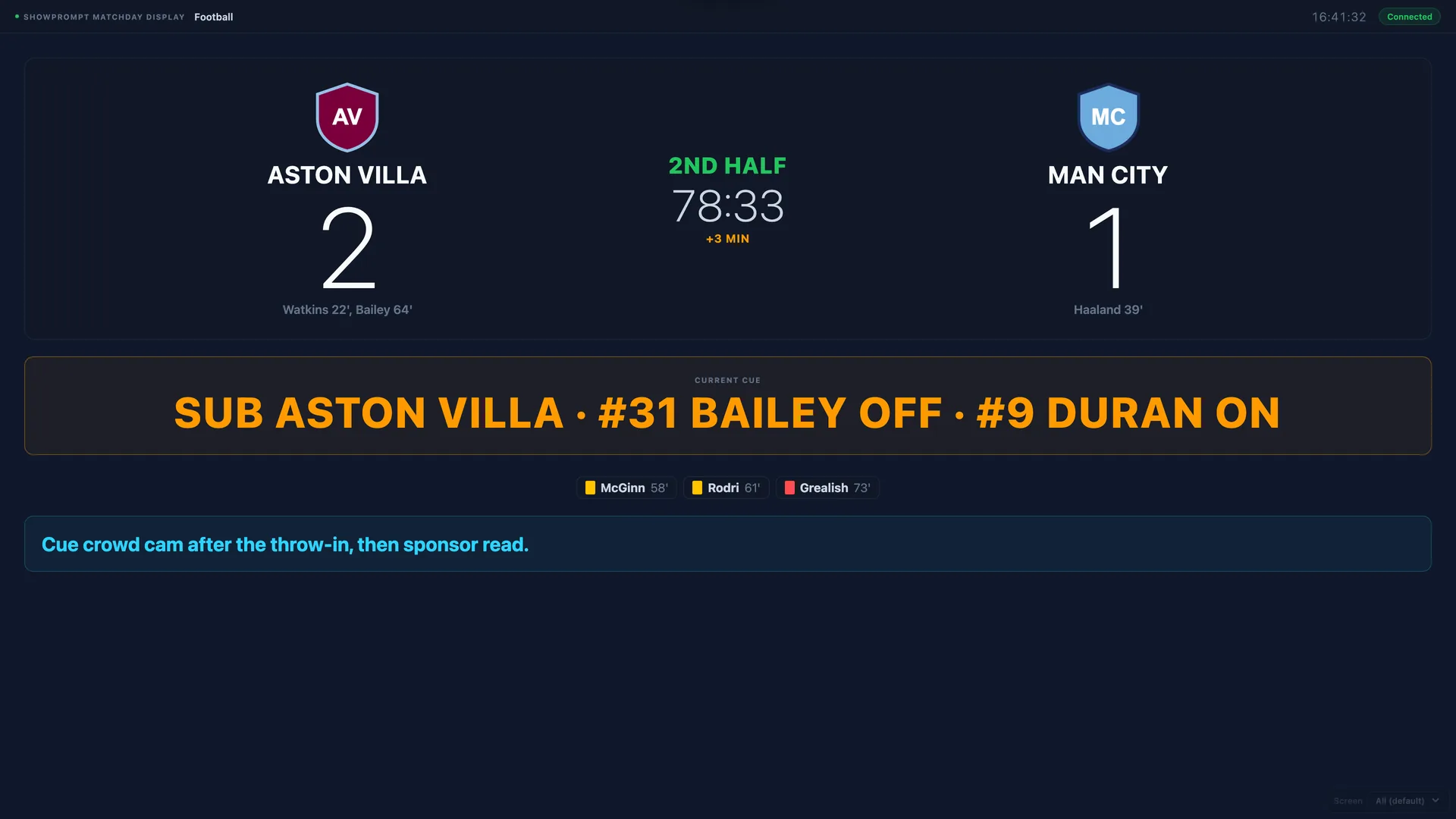
Most stadium AV teams aren't huge. Three or four people on a matchday, working concourses, the bowl, hospitality, and the broadcast cue room — sometimes all at once. The technology has to do the heavy lifting so the team can focus on the dozen things that can't be automated.
A matchday cue system isn't optional. You need synchronised countdowns to kick-off, a match clock visible from every screen, scoreboard updates that go everywhere at once, and crew cues that don't depend on someone hearing a radio over a 30,000-person crowd.
Here's a practical breakdown of how a small team can run that whole stack from a single laptop.
What the matchday looks like
For a typical home football fixture:
- 90 minutes pre-kick-off: stadium opens, concourse screens come up with kick-off countdown
- 60 minutes pre-kick-off: hospitality screens active, team news pushed to relevant displays
- 30 minutes pre-kick-off: teams warm up, big screens active, broadcast handover countdowns visible in the cue room
- 5 minutes pre-kick-off: tunnel cameras up, walkout cue chain begins
- Match: live clock, score updates, half-time countdown, second half clock, full-time
- Post-match: man of the match, fixture preview, broadcast handover, lockdown
Each of those phases needs synchronised cues to multiple screens — sometimes 20 or 30 different displays around the stadium.
What ShowPrompt does in this stack
ShowPrompt's Matchday mode is built specifically for this workflow. Nine sports supported, but for football specifically:
- Match clock counting up from 00:00, adjustable for added time
- Score panels for home and away, one-button increment
- Period markers — first half, half-time, second half, full-time
- Preset cue messages — KICK-OFF, GOAL, HALF-TIME, FULL-TIME, etc.
- Multiple output screens, each able to show a different view
The operator dashboard sits with one person on the laptop. Every connected screen in the stadium that's on the same network can pull the relevant display. Concourse TVs see the match clock and score. Hospitality screens see the same plus next-fixture promo. The broadcast cue room sees crew-facing cues — "STAND BY VTR", "GO TO STUDIO".
Why a single laptop works at venue scale
ShowPrompt's controller serves display pages over your local network — it's not pushing them to a cloud server and back. As long as the screens around the stadium are on the same network (your venue's internal AV network, typically), each one just opens a URL and becomes a display.
You're not limited by display device. Cheap commercial TVs with a built-in browser work. Raspberry Pi units running a Chromium kiosk work. Existing media players that can open a URL work. Phones for spotters and runners on the gates work.
The control logic stays on one laptop. The displays stay simple.
Crew cues during the match
Beyond the public-facing scoreboard, the operator can push private cue messages to crew displays. "STAND BY TUNNEL CAM", "GOAL — REPLAY READY", "INJURY — HOLD ADVERT BREAK". The crew sees the cue on their display, the public scoreboard never sees it.
For a small team, this replaces a lot of radio chatter — which gets harder to hear as the crowd noise builds.
Recovery if it crashes
The one thing you cannot have at a matchday is a controller crash with no recovery path. ShowPrompt auto-saves the entire show state every 30 seconds. If the controller laptop reboots mid-match, the operator restarts the application, hits "Restore", and the match clock, score, period state and cue list are all back where they left off within seconds.
When to upgrade beyond Free
The Free tier won't cover this stack. For a stadium matchday you need:
- Multiple output screens (Pro: 4, Venue: unlimited)
- Mode-specific tooling for sport (Venue)
- Squads and substitutions on the controller (Venue)
- Auto-save and crash recovery (all tiers)
Venue tier is the right plan for stadium use. See the full sports matchday cue page or the pricing breakdown.