Built for live shows.
Not for IT departments.
On most live productions, time and cues are managed with whatever is to hand — a phone stopwatch, hand signals, a scrap of paper, or shouting down comms. It works, until it doesn't. ShowPrompt was built by industry professionals to fix exactly that.
The problem it solves
Without a cue system
- ✕ Speakers overrun and the schedule slips
- ✕ Hand signals get missed or misread
- ✕ Talent and crew see different information
- ✕ Cues delivered by shouting or messaging
- ✕ No clean confidence screen for presenters
With ShowPrompt
- ✓ One shared, accurate timer on every screen
- ✓ Cues appear instantly, clearly, in large type
- ✓ Talent and crew see one source of truth
- ✓ The running order drives the whole show
- ✓ A purpose-built, distraction-free talent view
If you have ever watched a speaker sail past their slot with no clean way to tell them — or priced up cue hardware and quietly closed the quote — ShowPrompt is built for exactly that gap.
Between the free tools that aren't good enough and the broadcast software you don't need, there's been nothing purpose-built for the working professional running a live show. That's what ShowPrompt fixes.
Where shows fall apart without it
These aren't edge cases. They happen on nearly every show that doesn't have a proper cue system in place.
Overrunning speakers
No visible timer means the speaker has no feedback. They keep talking. The schedule slips. Every subsequent item suffers. A shared countdown on stage or lectern ends this.
Missed hand signals
Stage managers wave from the wings. Presenters are mid-flow and not looking. The signal is missed, the cue is late, and nobody outside the team knows why it happened.
Crew running different clocks
The director's phone says one time. The floor manager's watch says another. The presenter's timer app says something else. Nobody is working from the same reference.
Cues by shouting or messaging
WhatsApp group messages, talkback shouting, and improvised hand codes. Every one of them is a failure point. A real cue system delivers clean, quiet, confirmed cues.
No presenter confidence screen
The presenter stands at the podium with no idea of the time, no confirmation of what's next, and no director notes. They're flying blind. That's a solvable problem.
Hardware too expensive to hire
Proper cue systems from broadcast suppliers cost hundreds to hire per day and need an engineer to run them. Most shows can't justify the cost, so they improvise. ShowPrompt changes the maths.
What being in control looks like
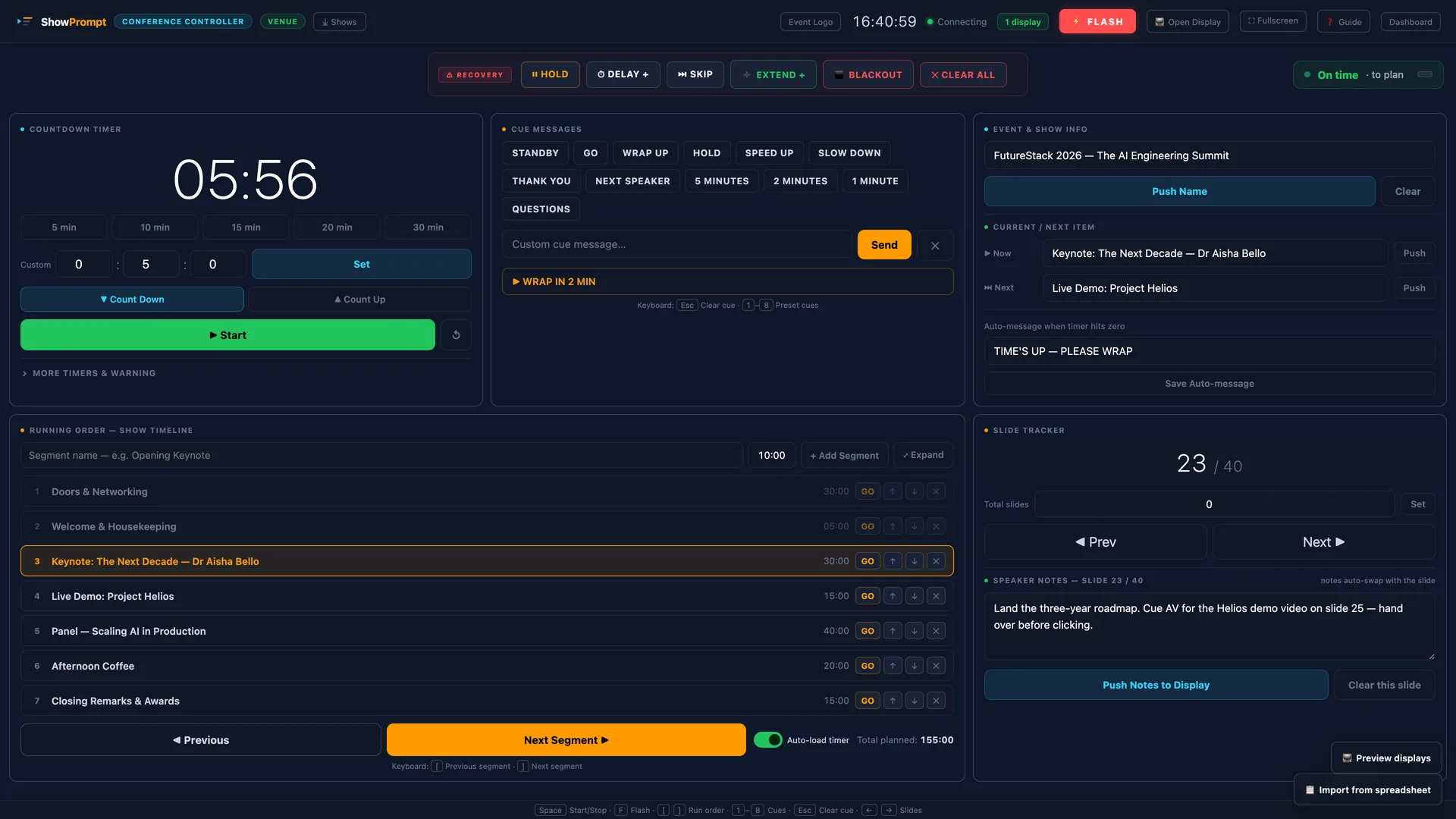
What ShowPrompt does differently
Every decision was made by industry professionals who run live events and shows. The constraints are real. The solutions are practical.
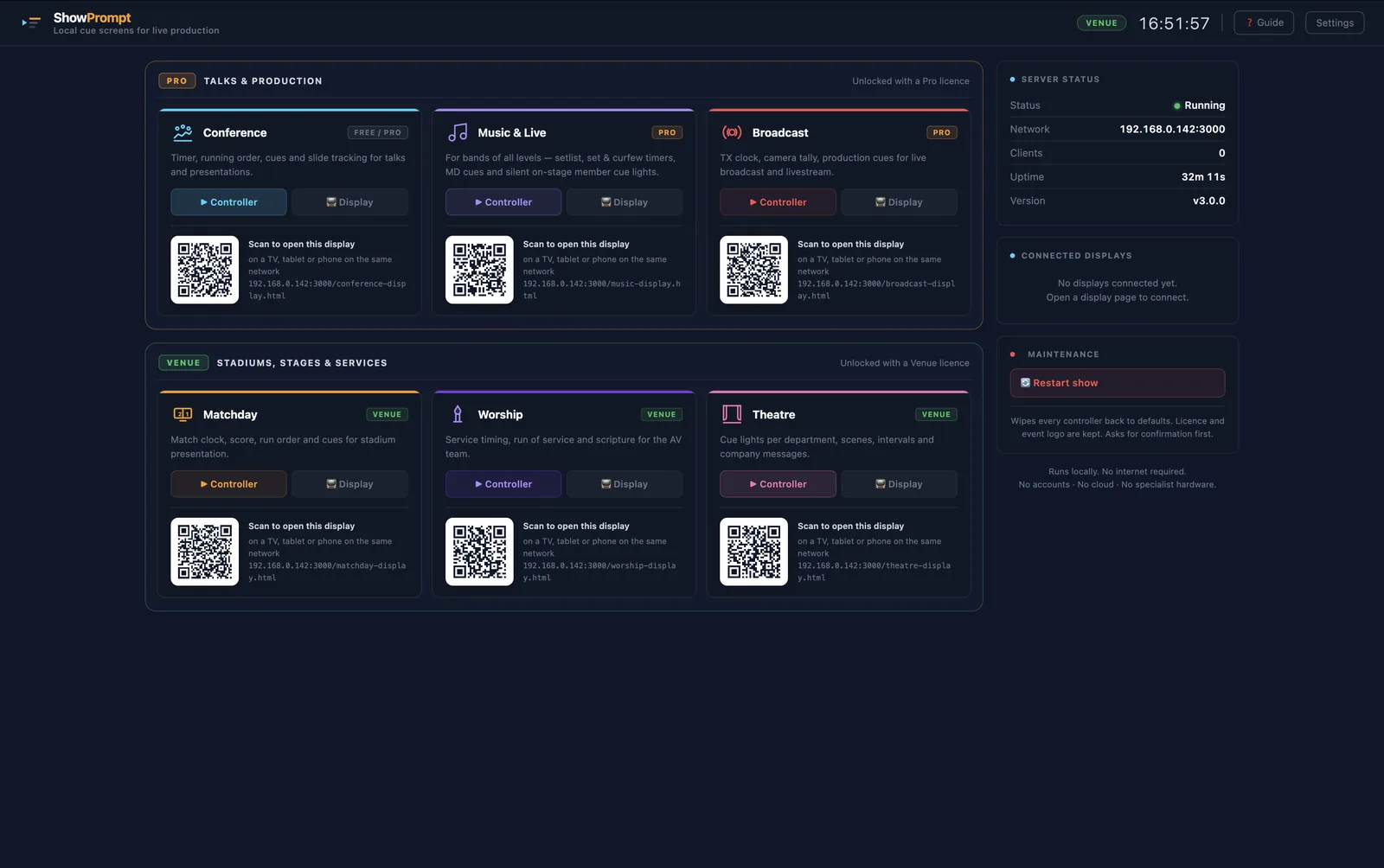
Nothing to install on displays
Display screens run in any modern browser. Works on rented laptops, locked-down machines, or borrowed kit. Nothing to install on display devices — just open a URL. The operator app itself is a free download that runs on Node.js on one laptop.
No internet during your show
ShowPrompt runs on your local network. A venue WiFi outage does not kill your show. There is no cloud service that can go down mid-performance, and display screens reconnect automatically if a link drops.
Licence key — no forced account
Free users never need an account. Paid users activate with a key. No logins mid-show. No password resets when the venue's guest WiFi blocks authentication servers.
Any screen is an output
A phone, a tablet, a smart TV, an external monitor — if it has a browser, it can be a screen. No proprietary hardware, no special cables, no per-device licence.
Five-minute setup
Non-technical staff can set up and run ShowPrompt without reading a manual. If it's too complicated to hand to a runner on the day, it's too complicated full stop.
Private by default
Nothing leaves your network: no accounts, no telemetry, nothing sent anywhere. What happens on the show stays on the show. Important for clients and venues with strict data policies.
Scales without surprises
The Venue tier runs unlimited local displays across a whole site — any device with a browser can join. No per-screen licences, no extra hardware, no pricing surprises when you add a screen.
Built around real workflows
Conference, Music & Live, Broadcast, Matchday, Worship, Theatre — six modes, each shaped by how those shows actually run, not by what was easiest to build or looked good in a demo.
Priced for working professionals
Between the free tools that aren't good enough and the broadcast software you don't need. ShowPrompt costs less than an hour of specialist cue-hardware hire.
Built around what matters
Every decision in ShowPrompt was made around what a real show needs on the day — not what looks good on a product page.
Built for everyone on the show team
Most cue tools do timers well. ShowPrompt adds the bits that matter when something goes wrong — for the operator, the producer, and everyone in between.
📋 Producer Mode
Read-only show overview for producers, directors and show callers. Current segment, next segment, drift indicator, all live timers, connected displays, live cue feed — one screen, no controls, just clarity.
⚠ Show Recovery
Hold, Delay, Skip, Extend, Blackout, Clear-All. Six recovery actions on every controller. Built for the operator when shows go sideways. Press-and-hold confirms for destructive actions prevent mid-show misclicks.
⏱ Smart Timing
Add planned durations to your run order and ShowPrompt tracks drift in real time. Running 4 min late · projected end 21:34 — shown to the operator and the producer.
🎛 Stream Deck via Bitfocus Companion (coming soon)
A Bitfocus Companion module is in development — it will turn a physical Stream Deck into the control surface for timers, cues and recovery. Not yet available; planned for Pro and Venue.
Free, Pro and Venue — feature by feature.
| Feature | Free | Pro | Venue |
|---|---|---|---|
| Countdown clock | ✓ | ✓ | ✓ |
| Flash warning | ✓ | ✓ | ✓ |
| Output screens | 1 | 4 | No limit |
| Account required | No | Licence key | Licence key |
| Conference mode | — | ✓ | ✓ |
| Broadcast mode | — | ✓ | ✓ |
| Music & Live mode (band, DJ, solo, function, comedy) | — | ✓ | ✓ |
| Cue lists & running orders | — | ✓ | ✓ |
| Presenter notes | — | ✓ | ✓ |
| Save / load show files | — | ✓ | ✓ |
| Matchday mode (9 sports) | — | — | ✓ |
| Squads & substitutions | — | — | ✓ |
| Worship mode (6 traditions) | — | — | ✓ |
| Theatre mode (DSM cue lists & scenes) | — | — | ✓ |
| Music — Festival / multi-stage (multiple stages, per-stage curfew) | — | — | ✓ |
| Parallel named countdowns | — | — | ✓ |
| Unlimited output screens | — | — | ✓ |
| Monthly price | Free | £12/mo | £29/mo |
ShowPrompt vs the other tools on the market.
| Stage Timer 2 | ProPresenter | DIY / Free Tools | ShowPrompt ✦ | |
|---|---|---|---|---|
| Price | Free–$99 / $5/mo | $15–25/mo | Free | From £12/mo |
| Free tier | Limited | — | ✓ | ✓ Full timer |
| Installation required | Desktop: yes | Required | Varies | ✓ Browser only |
| Works without internet | ✓ | Partly | ✓ | ✓ Local network |
| Cue lists | Paid only | Via slides | — | ✓ Pro+ |
| Running orders | Limited | Via slides | — | ✓ Pro+ |
| Presenter notes | Paid only | ✓ | — | ✓ Pro+ |
| Venue modes (matchday / worship / theatre) | — | Worship only | — | ✓ All three |
| Multiple output screens | Limited free | ✓ | — | ✓ 1 → 4 → Unlimited |
| No account needed | ✓ | Required | ✓ | ✓ Licence key only |
| UK GBP pricing | USD | USD | N/A | ✓ GBP, UK-first |
| Built for live shows | Partly | Partly | — | ✓ Entirely |
Everything from one screen
Ready to run your show properly?
Download ShowPrompt free. No account. No setup. Open a browser and go.
Free tier includes a full countdown timer and one output screen — no time limit, no account needed. Paid licences require occasional online validation, but ShowPrompt does not require internet during a show.